Cart Numbers for Weather!
Bay Boaters Forecast continues this weekend at 6:50, 7:50, 11:50, and 5:50! CART NUMBER 01041
KCQ Weather is saved in File Manager as KCQWX
Joe Weather is saved in File Manager as 0956
Bay Weather is saved in File Manager as 9230
All Weather is saved in the NEWS folder. Please DO NOT save it anywhere else.
EMERGENCY WX CART NUMBERS
KCQ is 9898
JOE - JRO-0010
BAY is BPO-0020
Air staff, please remember when saving an audio file in File Manager, the NAME or what we previously called the cart number, must be exact. If OpX and/or traffic calls for a file called 12345, 123456 will not work. KCQ_WX will not work for KCQWX. File 01410 will not work with 01410F.
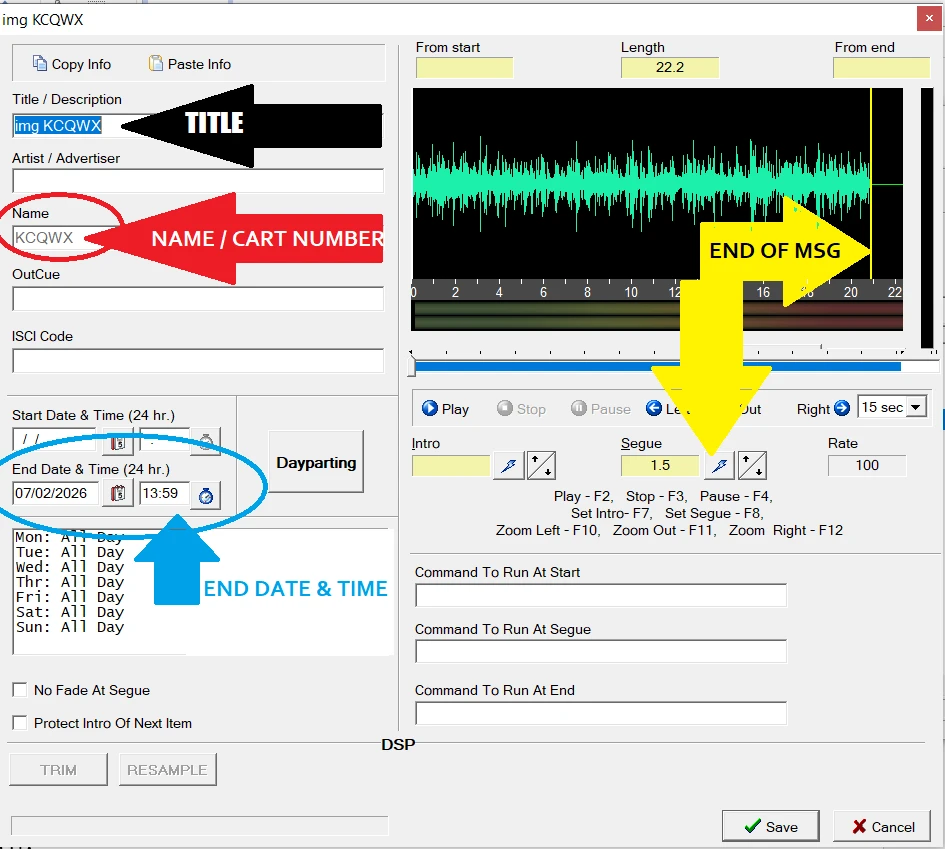
TITLE: This is what listeners see on the dash of their vehicles. For files like weather or station imaging, we include IMG before the title because RDS will block the names of these files from car displays.
NAME: If you are given a NAME (or cart number), you must save your audio file with the EXACT name. If you add a space at the beginning or end, if you add another letter, word or number, OpX will NOT recognize your file name. You may have uploaded it, but when OpX looks for 12345, it will not play file 12345jason.
Technically, you can NAME a file anything, but you must then INSERT that audio file manually, everywhere it needs to play.
All weather cart numbers are posted in the KCQ studio.
When doing your forecast the "Name" has to be exact to what is on the log or it will not play!!! So for Joe - 0956, Bay 9230, Bay Boaters 01041!
END DATE & TIME: This must be filled in for all audio with the exception of music and most station imaging. For weather, use the current day. Then enter the end time as 2 hours after your upload. We ask that you update weather every 2 hours so you’ll be replacing it anyway. If you do not, the end time will prevent weather from airing so you must update. If the weather has not changed, simply update the end time in file manager. When you hit save, the audio file will play.
END OF MESSAGE- You must place the “yellow line” at the end of the audio so OpX knows it’s time to play the next audio file. In the example above, if you did NOT place the end of message tone, there would be a couple seconds of dead air. Place the cursor at the end of the audio, the click the lightning bolt. Make sure to click SAVE!
HOW TO RECORD WEATHER!
Open Adobe
In Adobe go to the WX Open Folder
Open Bay/Joe/KCQ Weather Bed
Then click File New then Audio File
Record your weather
Click the Multi Tracker on the upper left side (below File, Edit next to wavform). This will open the multi tracker for you.
Drag your weather bed and audio file onto track 1 and 2
Line up your forecast after the voice guy’s intro and fad the bed out after your forecast.
Click the Multi Tracker button at the top left (next to File, Edit) and mix down files to a new file,
and then entire session.
Once file is mixed down clean up the front and back of the file. (Remove unused portions)
Then hit file save as, and save into your folder under the Weather Daily Use Folder (you may need to create this file the first time)
Save the file as either 9230 (Bay Wx), 0956 (Joe Wx) KCQWX (KCQ Wx) or 01041 (Bay Boater
Forecast).
Now open up File Manager
On the Left side go to your weather folder. On the right side open up the News Folder.
Click your weather file on the left side (it will be named the number you save it. EX. 9230)
Title is Bay WX/Joe WX/KCQ WX/Bay Boaters FX
Artist is left blank
Name is the number of the file and will already be there. Note this has to be either 9230, 0956,
KCQWX, or 01041 or the weather will not air!!!
Set the end date for the end of your shift.
Then set your end of mark and hit save.
Then between the left and right side hit the Top Blue Button to send the file to OPX. (it will ask
if you would like to overwrite hit yes)
That’s it, the weather has been updated!
WEATHER BASICS
WATCHES VS WARNINGS
A watch means "conditions are favorable" for a weather event to happen. It does not neccisarily mean its happening at that time.
A warning means severe weather is actually happening and listeners need to be advised to keep them safe.
Rule number 1:
During a weather warning you probably can't announce it too many times. When a weather warning happens, you must switch to full service information for your on air breaks. Gather all the information. Rehearse it off air. WHEN YOU ARE CONFIDENT and ready to go on air, give the details as soon as possible. Repeat the information and advise listeners to keep listening for updates.
Rule 2:
Because Joe and Bay are unattended, you must record the same information for those stations and upload it to OpX through file manager.
MAKE SURE YOU PUT AN END DATE AND TIME ON ALL WEATHER REPORTS so we are not accidentally airing old weather minutes and hours after it's relevant.
WATCHES
When a Thunderstorm watch or a Tornado watch is announced, make sure to mention it in your normal weather and mention it a second time about 30 minutes later. Keep that in the forecast until the National Weather Service says all clear.
THUNDERSTORM WARNINGS
When a Thunderstorm warning is announced, gather all the important information. Rehearse it. Go on the air at the next available moment, likely between songs or after a commercial. Announce all the information twice and go back to normal programming. At that point, go on the air every 2-3 songs and repeat the information. You may speak between songs to give this information. Severe weather and emergency information is when we stop music. Record this information to upload to Joe and Bay between your announcements on KCQ.
If you are on the air when a warning is announced by the National Weather Service, text Cooper or I so we can be in the loop and support as needed.
TORNADO WARNINGS
When a Tornado Warning is announced, gather all the information needed. Break into programming when you are confident and ready to deliver the information. You may fade out music. You may fade out a commercial if needed. Deliver this information 4-5 times, over and over again. Then play a song. Record a quick announcement for Bay and Joe and upload. Then, go back on the air at KCQ as soon as you can and repeat the information 4-5 times. Play a song. Continue to announce this information after each song until the all clear is given by the National Weather Service.
If you are on the air when a tornado warning is announced by the National Weather Service, text Cooper or I so we can be in the loop and support as needed.
TIME LIMITS
The National Weather service usually puts a deadline on all weather activity. A WATCH may be in effect for hours or days.
A Warning is likely in effect for minutes because those events happen fast and end fast.
When announcing these weather events you should include how long that weather event is expected to last. "The NWS has issued a Thunderstorm warning in effect until 3pm."
COUNTIES
KCQ has a huge footprint on air. You must primarily cover all weather events in Saginaw, Bay, Genesse and Midland Counties. All other counties are somewhat discretionary. A Tornado in our listening area must be covered. A Thunderstorm watch for Ovid may not be as critical. County and coverage maps for all three stations are posted in every studio.
The Bay and Joe don't generally cover Genessee county weather. However, Tornados should be announced.
EAS
Our EAS sytem is set to take over the station in the event a warning has been issued. Because DJ's listen to the PROGRAM SIGNAL in the studio, you may not even hear it on the air. Be advised it's airing and let it air fully. You can switch to AIR to hear it, but to go back on the air, you have to switch back. For perspective, you can see the two buttons in this picture.
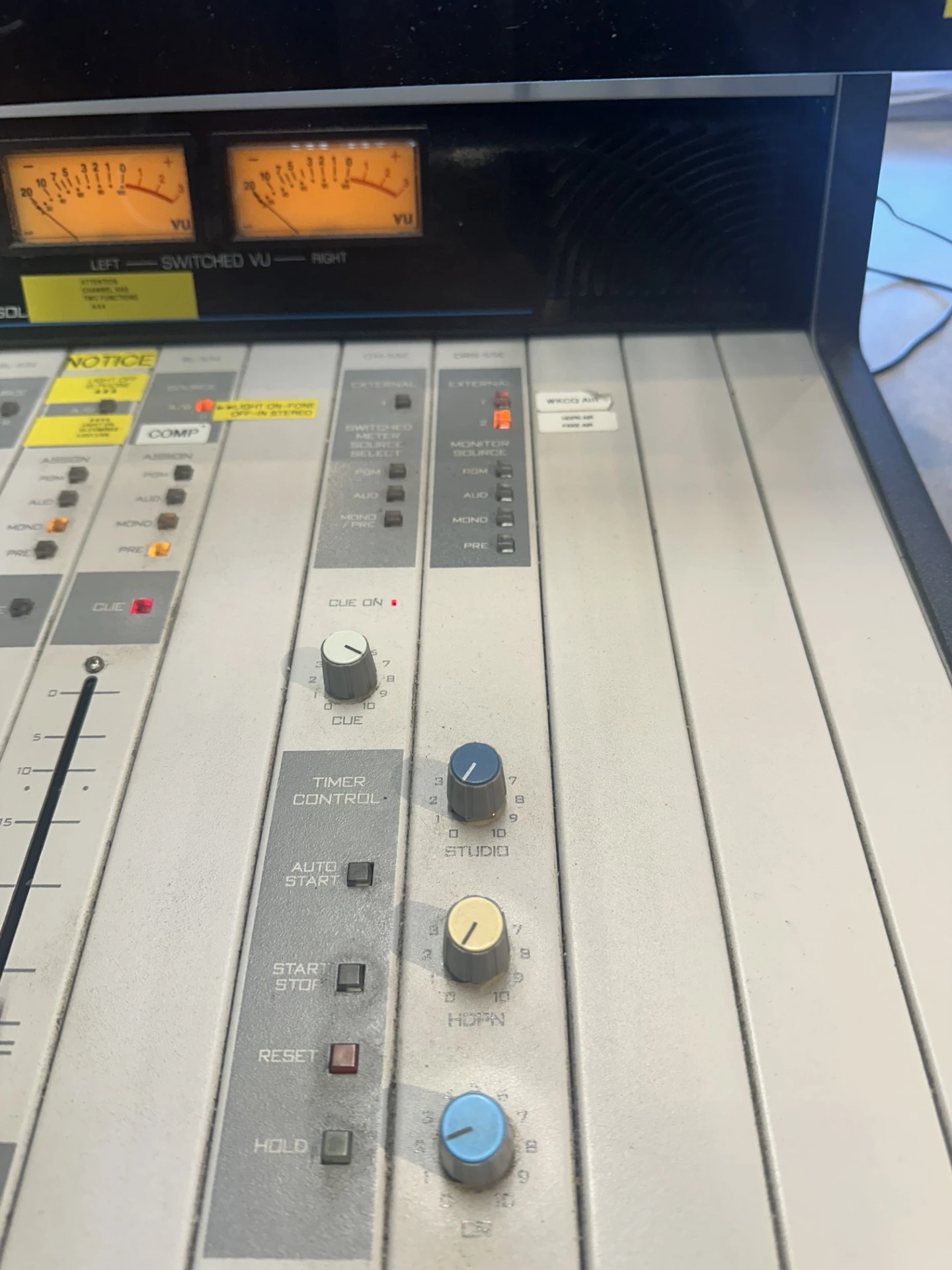
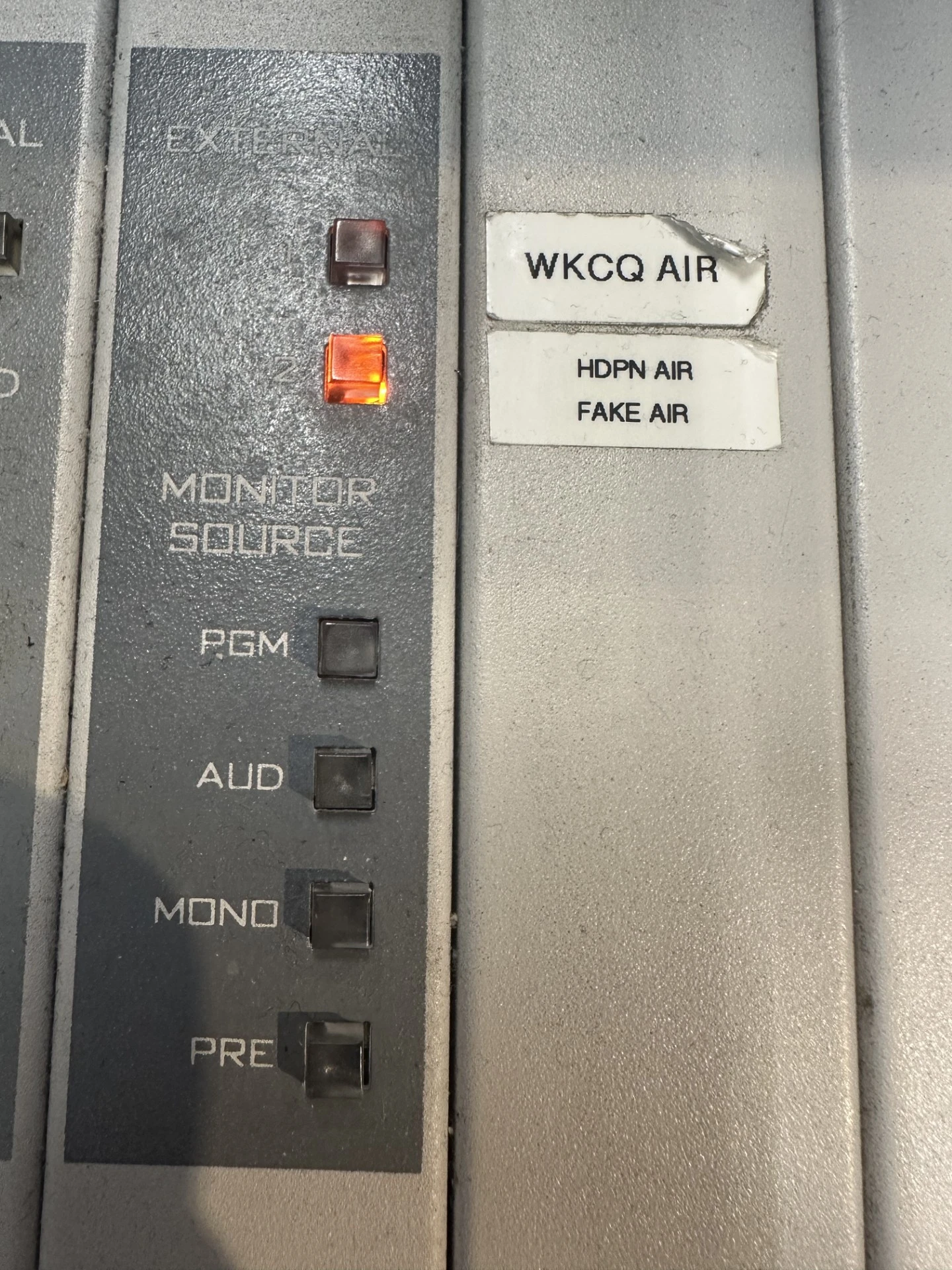
Here they are up close at the top of the board. To hear the EAS you must hit the WKCQ AIR button. But to be on the air, you must ALWAYS have HDPN AIR FAKE AIR pressed.
THE RACK
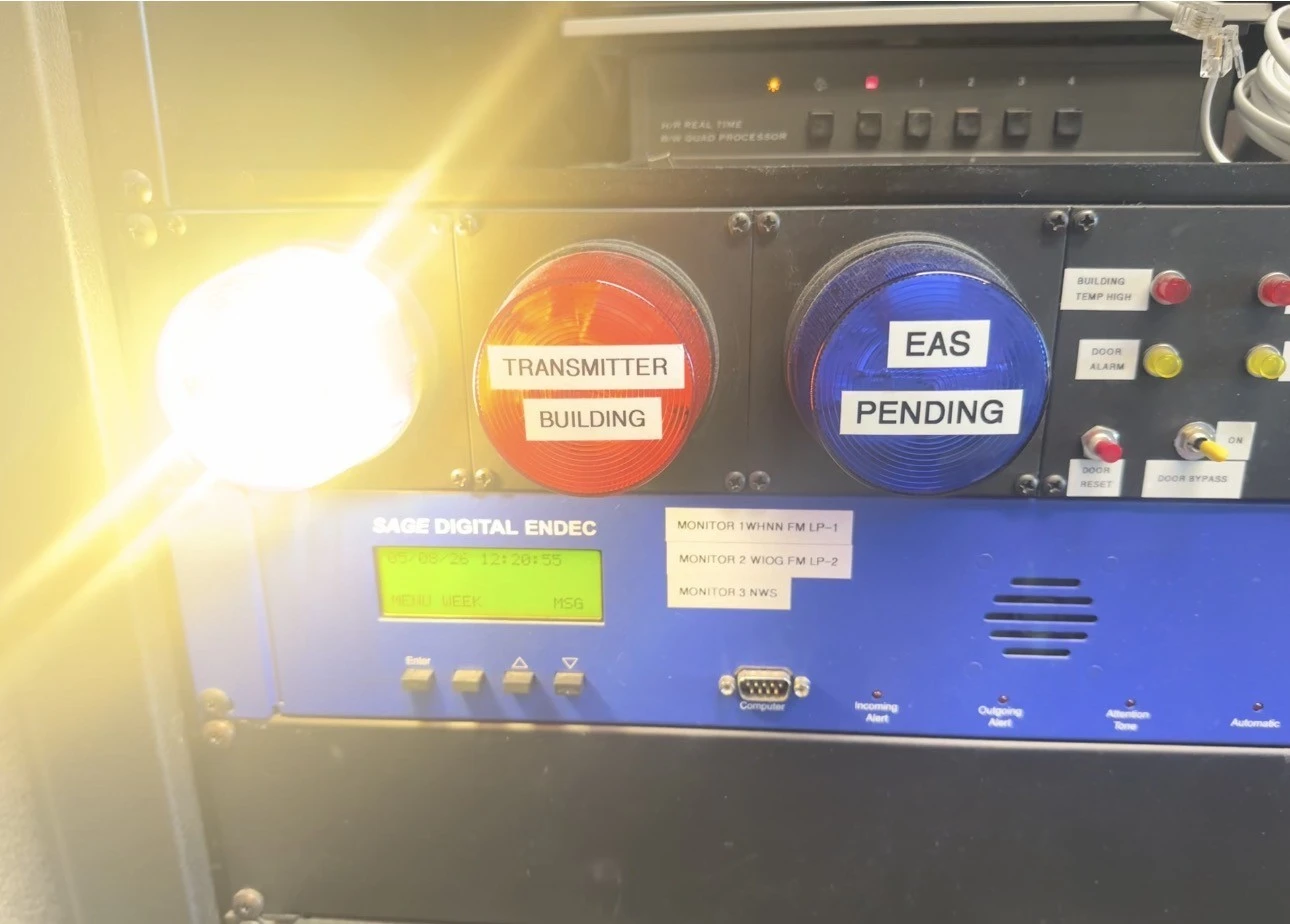
Upper. Notification lights and the Sage EAS Box.
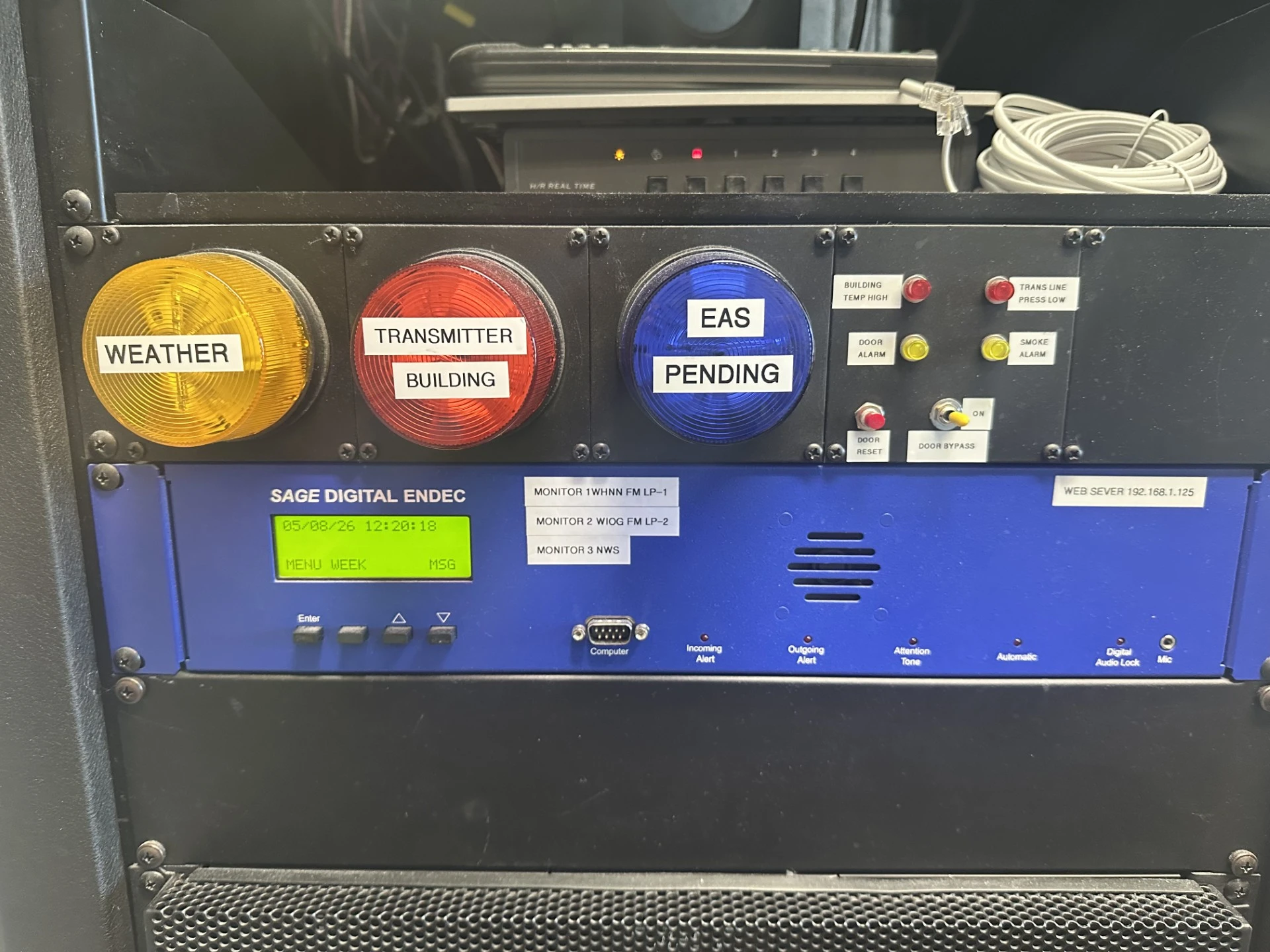
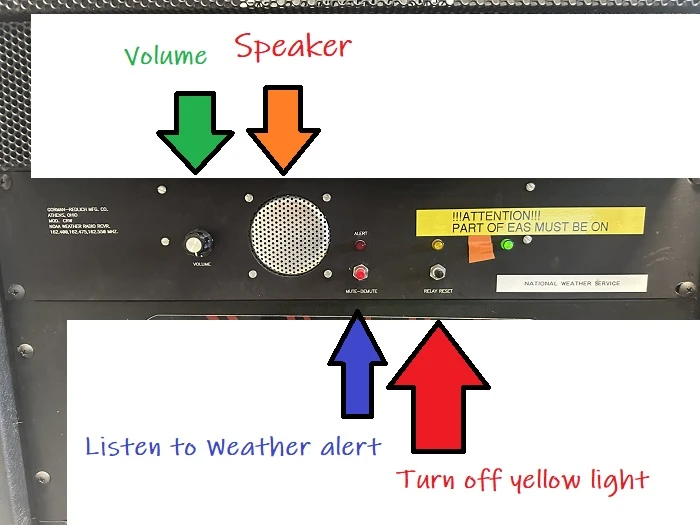
Lower. Including speaker, on air off buttons.
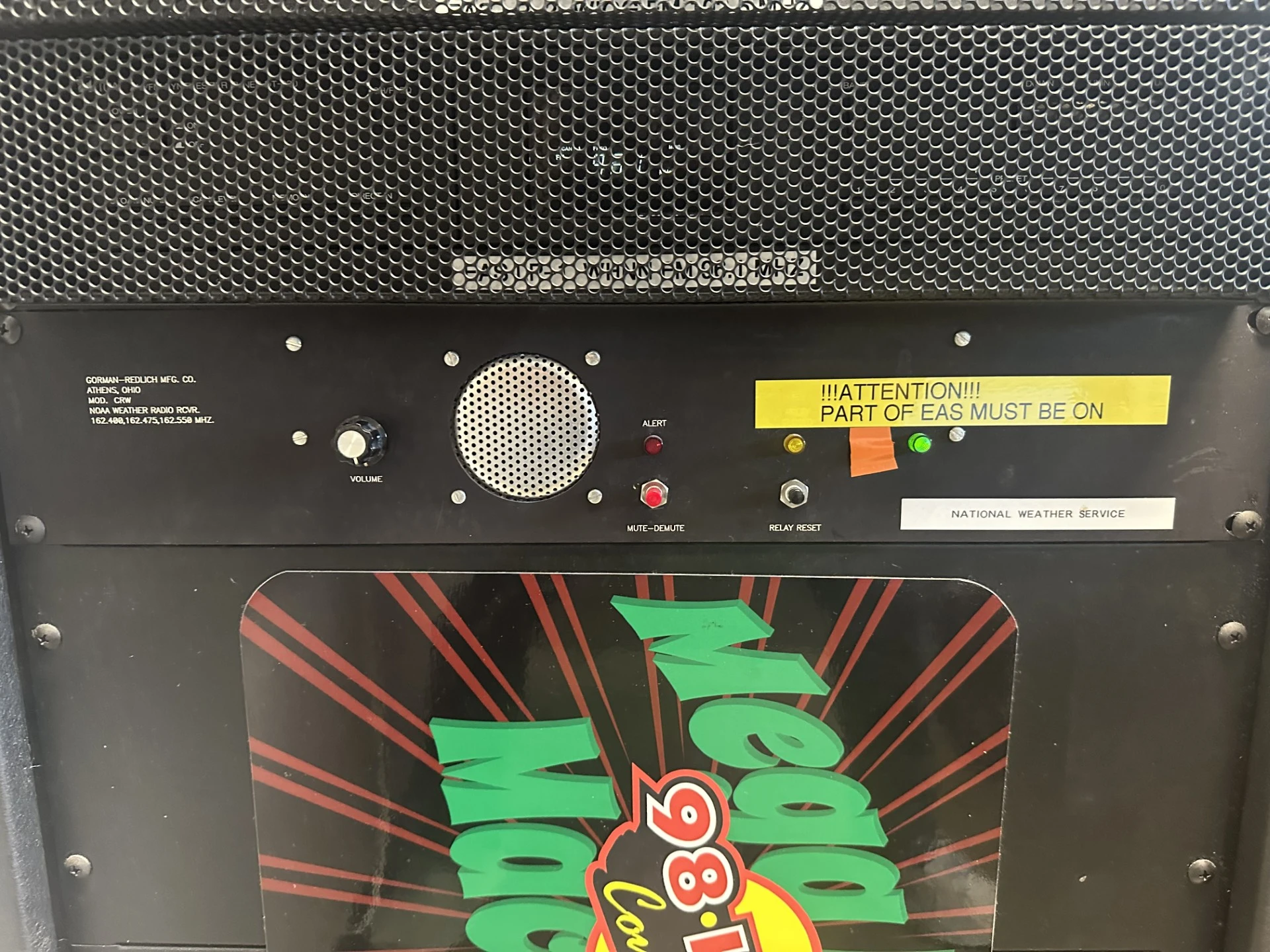
When there is a pending weather event, this yellow light will blink.
To hear weather anytime, hit the red button and turn up the volume on the speaker. When the yellow light is blinking, hit the black button to make it stop. THEN, turn up the volume on the speaker to hear the pending wweather information.
Obviously we are using the National Weather Service website for the bulk of our information. It is bookmarked in the KCQ studio. Please check it multiple times so you can stay in the loop for our listeners.
Not all stations make take the time to deliver accurate and consistant weather information but this company does.
Our philosopy remains to be of service to our communities to the best of our ability. WIth people using radio in cars, along with our compainies long history and track record of being where people stay connected locally, it's critical that each of us stay on top of this information. We must make sure its accurate, delivered well and in a timely fashion.
Remain calm. Be the voice of authority. Give the info with urgency but not panicked.
© 2026 WKCQ-FM, MacDonald Broadcasting

Built on Envisionwise Technology.